
Install Mods on Your Satisfactory Server
Add mods to your Satisfactory server in a few steps. The key is to enable the mod loader once so the server creates its mods folder — then you simply drop your mods in.
Before you begin: you'll need an active Satisfactory server and the mods already downloaded to your PC (from the in-game mod manager or ficsit.app).
1. Enable the mod loader
- Stop your server.
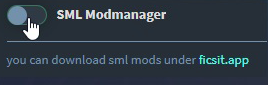
- In your Game Panel's Basic Settings, enable the SML mod manager.
- Start the server for about 2 minutes — this creates the mods folder — then stop it again.
2. Find your downloaded mods
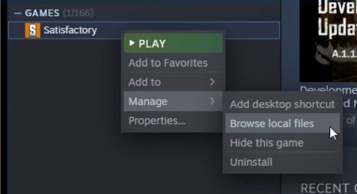
Locate the mods you downloaded on your PC. The easiest route is via Steam: right-click the game → Manage → Browse local files.
3. Upload the mods to your server
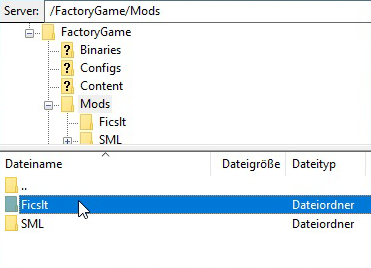
- Connect to your server files using FTP or the File Manager (both are in the Game Panel).
- Open the mods folder.
- Unzip each downloaded mod and copy the contents in — except SML itself.
4. Start and play
Start your server and join — your mods are now active. Have fun!
